The machine is down. The technician knows exactly what's wrong. And the part isn't on the shelf.
So the repair waits. Someone calls a vendor, someone else approves the purchase, and a quick fix can turn into days of stoppage.
If that sounds familiar, you're not short of skill. You're short of visibility.
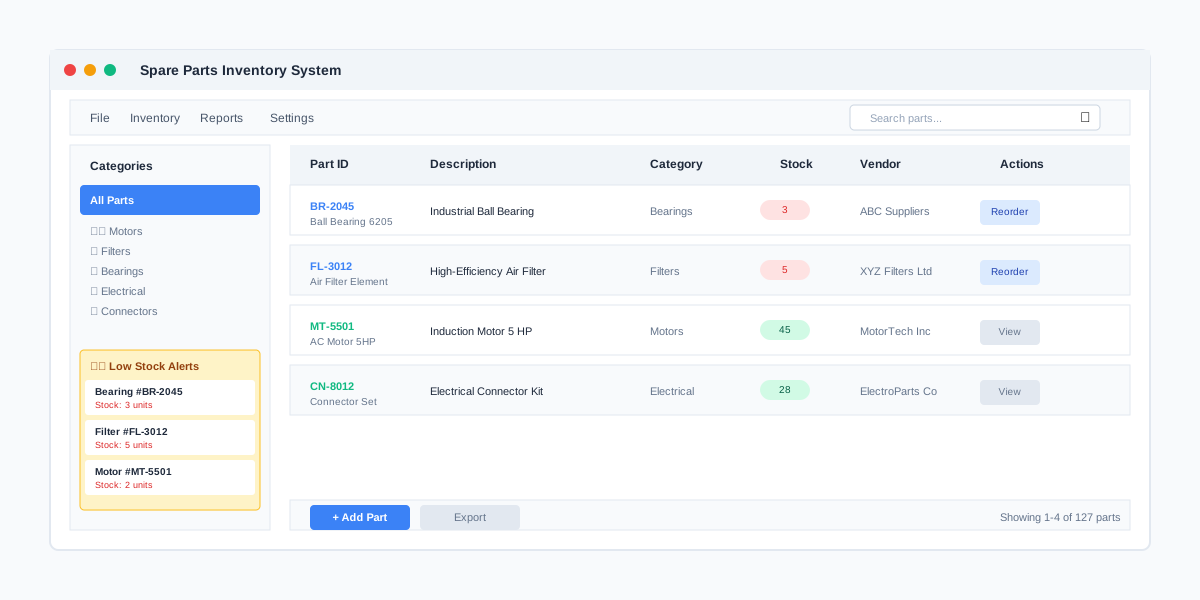
We built a spare-parts inventory system for an industrial client in exactly this spot. It took three months. Stock accuracy improved, procurement got faster and more accurate, and downtime from stock-outs went down. Here's what made the difference.
Why stock-outs keep happening
When we looked at how the client managed spares, three things stood out:
- Stock was tracked by hand. A spreadsheet or register, updated when someone remembered.
- Procurement started too late. Nobody knew a part was running low until it was gone.
- No history. Nobody could say which parts got used most, on which machines, or how often.
None of that is unusual. It's how most maintenance stores start. The trouble is that it doesn't scale — and every stock-out shows up as downtime on the floor.
What the system actually does
We kept it focused. Four things:
- Real-time stock levels. Take a part out, the count changes. No end-of-month reconciling.
- Automated reorder alerts. Each part has a minimum level. Drop below it and purchasing gets told — before the shelf is empty.
- Maintenance history. Every part used is tied to the machine and the job, so you can see patterns.
- Vendor linking. Each part knows who supplies it, so reordering is one step instead of a hunt through old emails.
We built it as a desktop app with local storage and sync, so the stores desk keeps working even when the network doesn't.
The reorder alerts did most of the work. Everything else just made them trustworthy.
Setting reorder levels without overthinking it
This is where teams get stuck — how low is "too low"? A simple starting rule:
- Look at how many of a part you use in a typical month
- Ask how long the vendor takes to deliver
- Set the minimum to cover that delivery time, plus a margin for the parts that stop critical machines
You won't get it perfect on day one. That's fine. After a couple of months the history tells you which levels to raise and which to lower.
The part people forget: history
Once every part is tied to a machine and a job, you start seeing things you couldn't before. One machine eating through the same part every few weeks usually means something upstream is wrong. That turns a stores problem into a maintenance insight.
It also connects nicely with machine monitoring and field-service apps — the same thinking, just applied to the parts shelf.
Is this worth doing for you?
Ask yourself:
- In the last month, how many repairs waited on a part?
- Could you say right now what's below its safe level?
- Do you know which machine uses the most spares?
If the answers are "too many", "no" and "not really", it's a quick win — ours took three months. See what we build for manufacturers, or tell us how your stores work today.